
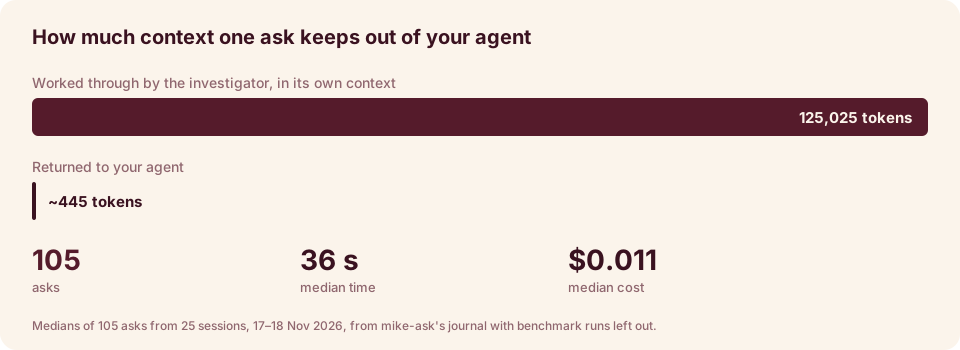
Most of a coding agent’s context goes on finding things out: searching, opening files, following calls, checking what was tried before. All of it stays in the context and crowds out the work the agent was asked to do.
ask-kit moves that work out of the agent’s context. It gives the agent one tool, ask. The agent
asks a question in plain words, and a cheap investigator works it out in its own context. The
agent gets back a short answer with the evidence it’s based on, and its own context stays free
for designing, writing and fixing code.
you:  add a CSV exporter like the other ones

agent → ask: how are the exporters built and registered, and which tests cover them?

ask   → Exporters implement Exporter in src/export/base.ts:12 and are registered in
        src/export/index.ts:30. JsonExporter (src/export/json.ts) is the closest model;
        tests are in test/export/*.test.ts.
        [code · glm-5.3-flash · 21s · $0.0031]
The agent reads that three-line answer and starts the change from there. (The exchange above is an example of what an answer looks like.)
How the investigator answers
For each step of a question, the investigator writes a small JavaScript program and runs it in a REPL. The program does whatever the step needs: loops, filters, joins, counts, comparisons, parsing. It is written fresh for that question. A domain gives the programs access to the data. What a program prints is all that returns to the investigator’s model. Common questions already have scripts, so it can start from one of those.
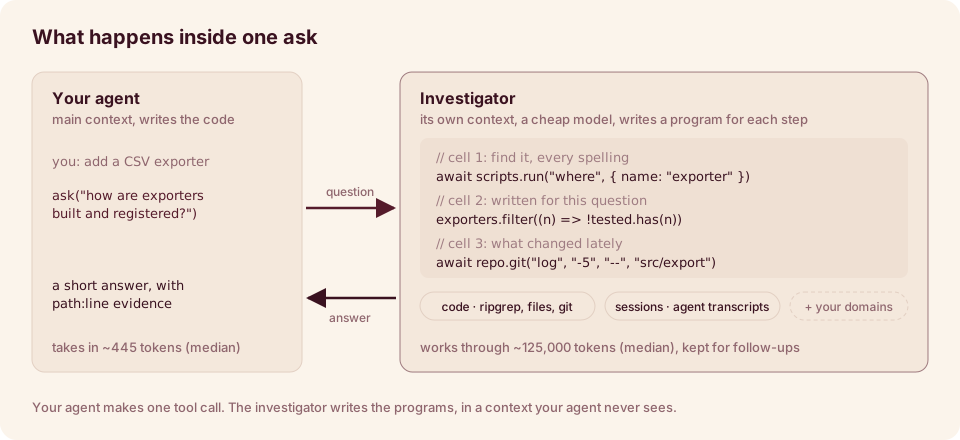
Your agent writes only the question and gets only the answer. The investigator is a cheap, fast
model, and its programs, their intermediate results and the files they read all stay in its
session; a follow-up with continue: true reuses what has already run, because the REPL’s
variables are still there.
How it works goes into more detail.
Each kind of thing ask can answer about is a domain. A domain gives the investigator’s
programs access to its data, and instructions for searching it. ask-kit comes with two, as a
starting point:
- code: the repository the agent is working in, cited as
path:line. - sessions: your past agent sessions, from the transcripts Claude Code, Codex, Copilot CLI, Gemini CLI and opencode already save.
Add your own for anything else your agent keeps digging through: a database, logs, a service, a docs folder.
Get started
-
Paste this into the agent you already use (Claude Code, Codex, Copilot CLI, Gemini CLI or opencode):
Read https://github.com/temet-ai/ask-kit/blob/main/AGENTS.md, then set up ask-kit for me.It installs ask-kit and asks you a few questions. The main one is which model does the digging.
-
Restart your agents.
-
Give your agent a task. It calls
askby itself when it needs to find something out. You can also ask directly:ask where the config file is read.
Guide pages
- Use it: what to ask, reading answers, follow-ups. Start here.
- Set it up: what setup does, and how to change it later.
- Choose the model: an API key, a subscription you already pay for, or a local model.
Use cases:
- Write code with it
- Search code and past work
- Pick up where you left off
- Make it better: fix the questions it answers badly.
More:
- Domains: teach
askabout something new. - How it works
- Command line and files
- What it stores and sends
- Troubleshooting
How-to guides:
- Write a domain: a working domain over a folder of notes, step by step.
- Add a script, including turning a draft into a script.
- Debug a bad answer: from a wrong answer to the fix, using the journal.
- Add a model or provider
- Support another coding agent: a transcript adapter and setup.
- Run the benchmark
- Run the tests
Reference:
- Config file: every key in
config.json. - The ask tool: parameters, answers and errors.
- What the investigator’s programs can reach: globals, helpers and every script.
- Files and environment variables
- Journal format
Internals, for changing ask-kit itself:
- Map of the code: the processes, every source file and a reading order.
- Life of one ask: router, backend, cells, answer and journal.
- The REPL: how cells run, saved state, scripts.
- Backends: APIs, agent CLIs and local models.
- Domains: the domain contract, the two built-in domains, the gallery.
- Transcript adapters: how each agent’s sessions are read.
- Setup:
init,setup,apply,doctor,uninstalland the files they write.
Status
Early. It has been used on one Linux machine. CI runs on Linux, macOS and Windows. There are no
releases yet, so you install from main.
ask-kit started as mike-ask, a proof of concept that answers from what mike records of every Claude Code session. ask-kit is the general version: it needs no mike and no server, reads what your agents already save, and can be given any domain.