A long session carries every earlier file read and command output in each new request, and you pay for them again on every turn. mike can shorten three kinds of that history before it reaches Anthropic: large file reads, large shell output, and a file read a second time with nothing changed. It always keeps the full original in its capture, so you can read what Claude actually saw and what was sent.
Compression is off on a fresh install, and two of the three parts record what they would have cut before they cut anything. This page says which does what, so you can turn on only what you trust.
Open Compression review in the menu, or /compression-review, for the queue of requests
you flagged. The switches are in Settings at /settings.
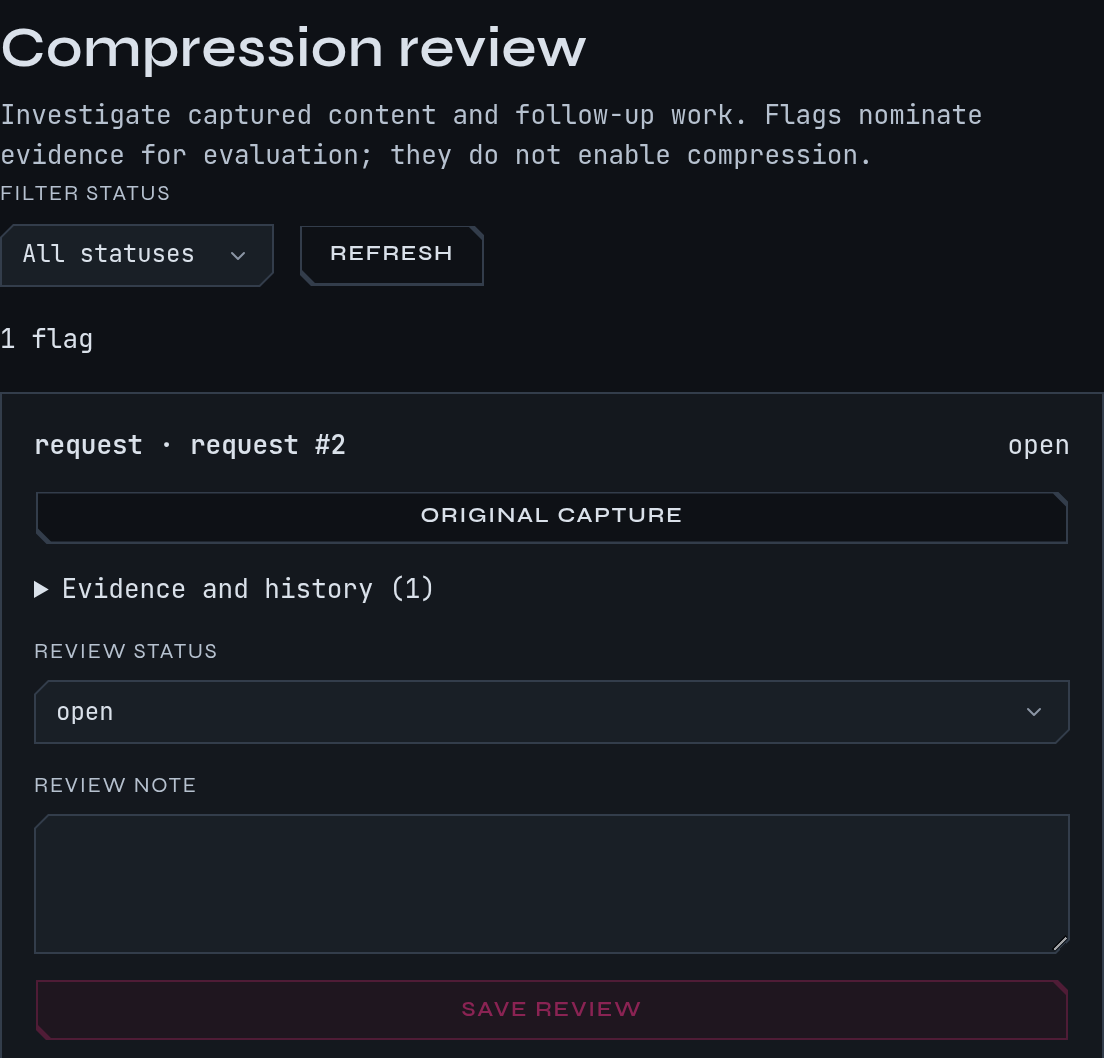
This is a fictional example: the docs session in ~/projects/site, with
one flagged build log.
What cuts today
| Part | What it shortens | A fresh install | Sends changed requests when |
|---|---|---|---|
| File-read compression | A file Claude read earlier, in the history | Off | You turn it on and set its mode to forward, or give it a share above 0 |
| Shell-output compression | The output of an earlier Bash call |
Off | The same two things |
| Rewrite duplicate reads | A Read, or cat <file>, of a file whose content Claude already has |
Off | You turn it on |
“Shadow” is the default mode for the first two. With a switch on and the mode left at
shadow, the share of sessions that are sent shortened requests is 0, so nothing is
shortened: mike works out what it would cut, records it on each request, and forwards the
request unchanged. That lets you see the saving before you accept it. A fourth mechanism in
the settings file, [compress], only measures how much minifying JSON and squeezing blank
space could save. It never changes a request.
What never changes in any mode: your original capture, Claude’s answers, the system prompt, and the most recent results, which stay whole for a few answers (see below).
Try it on the example session
Continue the docs session. It has run npm run build four times and read the install page
twice, so each request carries long output. You want to see what a cut would save without
risking the session.
- Open Settings, find Shell-output compression and turn on the switch. Leave Mode
on
shadowand Share of sessions forwarded at 0. - Start a new
docssession. The change applies to sessions that start afterwards. - Run the build in it until the output is long, then open a request and read its
transformation manifest. Under the shell_output_compression stage you should see
computed only, how many results would be shortened and the bytes saved, and the request shown as forwarded unchanged. - If the cuts look safe, set Share of sessions forwarded to a small number such as 20,
or set Mode to
forwardfor every new session. Sessions started afterwards are sent the shortened requests; sessions that started earlier keep the arm they began with.
To go back, set the switch off, or set the mode to shadow and the share to 0. A session
already running keeps its policy until you start another.
mike features everything turns on the two compression switches, still in shadow with a
share of 0. mike features recommended and watch-only leave them off. See
Setup for the presets.
File reads
When Claude read a file earlier in the conversation and has since moved on, the old read is rarely needed whole. File-read compression keeps the start and the end of that result and replaces the middle with a note that says what was left out. When Claude later reads the whole of the same file again, the earlier whole-file read is replaced by a note saying a newer read superseded it.
| Setting under File read compression | Default |
|---|---|
| Minimum bytes before reduction | 1,500 |
| Head lines retained | 40 |
| Tail lines retained | 20 |
| Answers before a read is shortened | 3 |
| Enabled tool producers | Read |
| Mode | shadow |
| Share of sessions forwarded | 0 |
Files that carry instructions are never shortened. The default protected paths are
**/CLAUDE.md, **/BRIEF*.md, **/.claude/**, **/docs/plans/**, **/artifacts/threads/**
and **/*.rules.md. You can change the list in Protected paths.
Shell output
The same idea for Bash results. It keeps the first and last lines, the lines that look like
errors or summaries with a few lines around each, and replaces the rest with a marker such as
output lines 41-380 omitted (340 lines). A result that Claude reported as an error is never
shortened, and a cut must save at least a quarter of the result to be worth making.
| Setting under Shell-output compression | Default |
|---|---|
| Minimum bytes before reduction | 1,500 |
| Head lines kept | 20 |
| Tail lines kept | 20 |
| Lines kept after each error or summary line | 3 |
| Most error or summary lines kept | 40 |
| Answers before output is shortened | 3 |
| Mode | shadow |
| Share of sessions forwarded | 0 |
Duplicate reads
When Claude reads the same file twice and nothing has changed, the second result repeats the
first. With Read dedup → Rewrite duplicate reads on, mike replaces the repeat with a one-line
note that names the earlier read and says to read again after an edit. An Edit, Write or
notebook edit of that file makes the next read count as new. It looks at Read and plain
cat <file> commands only.
With the switch off, mike still counts duplicates and records what it could save, and forwards the request unchanged.
The settings page shows Rewrite duplicate reads as on by default. In the code a fresh install starts with it off, so nothing is rewritten until you turn it on. Check the switch.
How mike avoids breaking Anthropic’s cache
Anthropic caches the start of a conversation for five minutes, or an hour when the request asks for it, and changing early text breaks that cache. While the cache is still warm, mike keeps the results it has already shortened shortened and leaves every other result as it was. New cuts begin once the cache has gone cold. This is why a cut can wait several minutes instead of appearing on the very next request.
Flag a capture for review
If a shortened result looks wrong, or a long one deserves shortening, flag it.
- Open the request in the session, find the request body, response or tool result.
- Choose Flag for compression. The dialog reads Investigate compression.
- Fill in Reason (what could be shown more precisely) and Evidence (facts or later calls to keep), then Save flag.
- The button reads Flagged for review, and Review queue opens
/compression-review.
A flag does not turn compression on or change any request. It nominates evidence for you to
look at. On the review page each flag shows the request, an Original capture link, and
Evidence and history. Set Review status to open, investigating, evaluated or
dismissed, write a Review note and choose Save review. Filter status narrows
the list and Refresh reloads it.
When there is nothing to see
| What you see | Why, and what to do |
|---|---|
| No flags match this status. | Nothing is flagged, or none has this status. Flag a request, or choose All statuses |
| Review queue unavailable | mike could not load the list. Use Retry, or run mike doctor |
Switch on, no computed only note on requests |
The request had no result large enough, or the session started before the switch. Start a new session |
| Cuts never reach Anthropic | Mode is shadow and the share is 0. That is the default; see above |
| The cuts you wanted did not happen | A protected path, an error result, a recent result or a still-warm cache each skips a cut. The manifest lists the reason for each skipped result |
What leaves your machine
These parts shorten what is sent to Anthropic and send nothing anywhere else. Your capture still holds the full original. See Privacy for everything mike stores and sends, Settings for every switch and its default, and Filters for changing the system prompt instead.