Memory keeps what you corrected in one session and puts it in front of the next one. A correction becomes a lesson: a short standing rule for a project, such as “Put Homebrew first on the install page.” Later sessions in that project can be handed it, ask for it by topic, or find it by search. mike also keeps a search over your project’s notes, Claude Code memory files and skills. Memory does not change your code, and it never writes a rule or a skill into your project folder without your approval.
Some of this is on in a fresh install and some is off. The table under What is on in a fresh install says which, and what each part sends to Anthropic or off your machine; Privacy has the full list.
Open http://localhost:9990/memory for the Memory page. Skills and Proposals sit beside it in the menu, as the pages for lessons that become files in a project.
This is a fictional example: a project ~/projects/site, a session named docs
and one correction. Nothing on the picture is a real prompt.
Keep a correction as a lesson
Continue the example. Halfway through the session docs (goal “Rewrite the install page”)
you tell Claude: “Put Homebrew first on the install page.” You want the next session in
~/projects/site to start from that.
- Ask Claude to keep it: “Record that as a lesson.” Claude calls
record_lesson, a tool from mike’s MCP companion, with a kind and the rule. - Or let Claude write the rule at the end of an answer as
<mem:update topic="install-page" kind="correction">Put Homebrew first on the install page.</mem:update>. mike reads these tags out of finished turns and stores each as a lesson. A tag only counts in the turn’s last reply, not in text written before a tool call.kindiscorrection,convention,warningorpreference; a tag without one is stored asconvention. This runs by default and makes no model call. - Check it was stored. Ask Claude for
list_lessonsfor the project, or open Find a lesson below. The lesson is listed with its kind and the session it came from.
A third way needs a model provider and is off by default: with the judge_lessons switch
on, mike drafts a lesson from a correction it noticed. The settings page shows this switch
under its raw name, judge_lessons, with no label or description, and it only runs while
the Steerer switch is also on. That sends the correction and the
turns around it to the provider you set up with mike setup models; see
the judge for providers and what is sent.
A stored lesson does nothing to a session until it is delivered. A fresh install stores lessons and delivers none.
Get a lesson into the next session
There are three ways a lesson reaches a session. Each adds a block of text to the request Claude Code sends to Anthropic, so each is a switch you choose.
| How | What happens | Switch |
|---|---|---|
| First-turn lessons | On a session’s first turn, mike adds the project’s lessons, up to 5 (the Max lessons to inject setting) | Inject lessons |
| Recall | When Claude writes <mem:recall topic="install-page"/> in an answer, mike adds the lessons for that topic to the next request, up to 3 per topic |
Recall from project memory |
| Subagent lessons | On a subagent’s turns, lessons scoped to that agent | Agent lessons |
For the example, turn on first-turn lessons and open a new session in ~/projects/site.
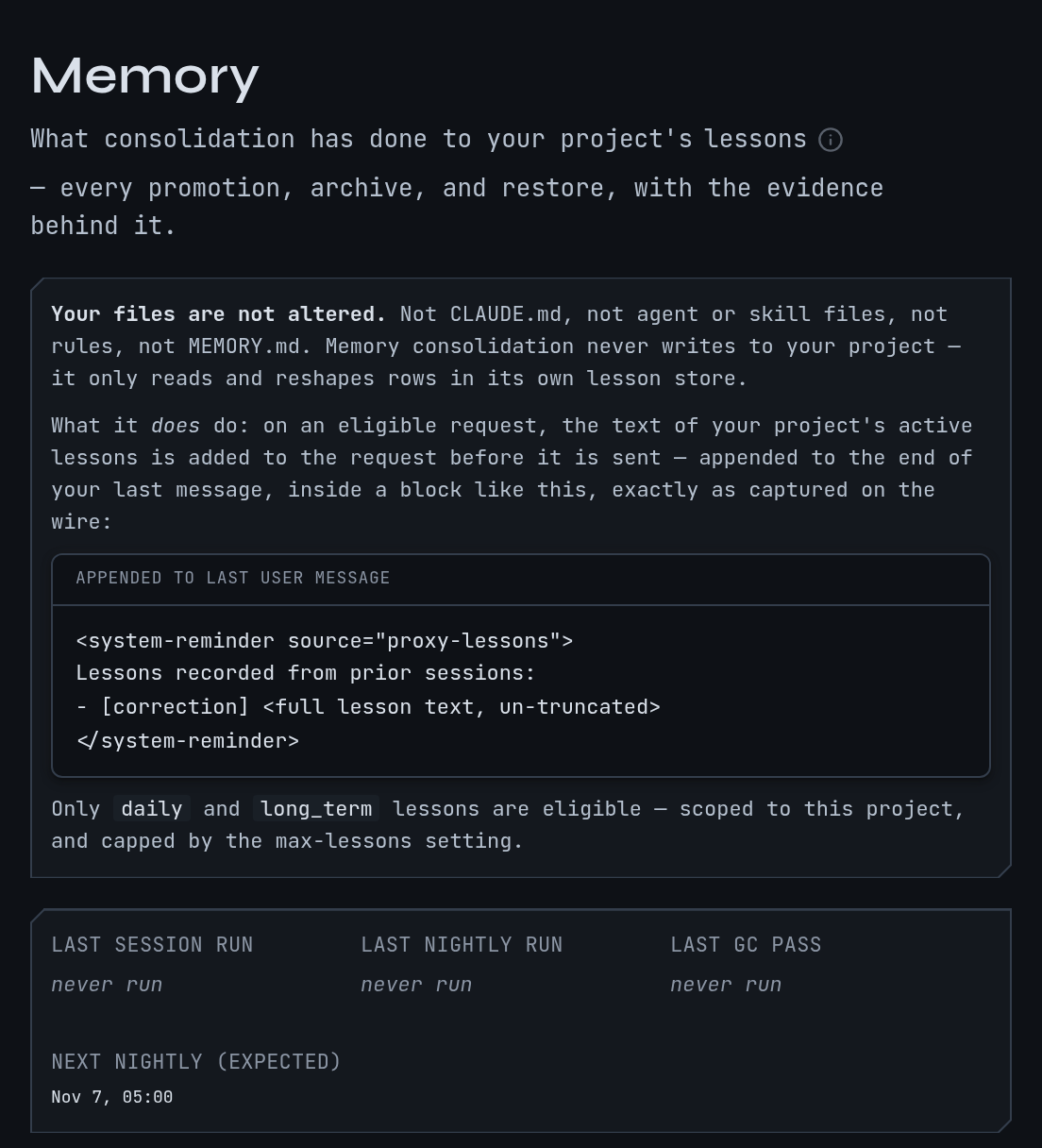
Its first request now carries the Homebrew correction, as a <system-reminder> block
labelled as a lesson. Open the request page (Read a session) to see
the block, and the Lessons touching this session panel on the session to see which
lessons it was shown and when. A session already running keeps the settings it started
with; the changes apply to new sessions.
mike features recommended turns these three on, plus diagnostic reminders (below).
mike features watch-only turns them off and mike features everything turns on every
switch in mike, including ones that send text to a model. With mike not running, the
command says so and saves the choice for the next start. Each preset is also a choice in
setup, and every switch is at http://localhost:9990/settings. See
Settings.
Delivery by Remote Control reaches an idle session as a message, so the request body is unchanged. In every other case the stored copy of the request is the one Claude Code sent; the forwarded one differs by the added block.
Find a lesson or a note
Memory is also searchable. In a session, Claude can ask:
search_project_knowledgefinds lessons, session notes, earlier turns, mail between sessions, work threads, Markdown documents, Claude Code memory files and project skills in one query. It matches on text, and on meaning when embeddings are available.read_project_knowledgereturns the full text behind a result.list_project_locationsfinds the project a query belongs to.recall_project_contextreturns the latest corrected turns and the active lessons in one call.
In the example, searching for “Homebrew” finds the lesson and the turn where you made the correction.
mike indexes two sources by itself for each checkout registered to a project: Claude Code’s
memory files for the project (every .md file except MEMORY.md) and the project’s
skills in .claude/skills/<skill>/SKILL.md. Other Markdown, such as docs and design notes,
needs the scripts/mike-knowledge collector in a mike source checkout, which needs
Python 3 and PyYAML.
Searching sends nothing to Anthropic: results go back to the session that asked, as a tool result, and that session’s next request then contains them like any tool result. Nothing leaves your machine, with one exception: embeddings are on by default but point at a loopback address, and mike refuses any embedding address that is not on your machine unless you turn on Allow a remote embedding server. If you do, the text being indexed or searched goes to that server.
Review what memory did
Open Memory in the menu. A background job consolidates the lessons of each project nightly: it merges near-duplicates, retires stale lessons and archives them. The page shows what it did, with the evidence behind each step:
- A strip of recent consolidation runs.
- Lessons it thinks are related, which you confirm or reject.
- Outcomes: whether corrections fell after a lesson was delivered.
- Decisions: every promotion, archive, evaluation and restore, newest first. Filter by Project, Session, File or Action, then Apply; Clear resets the filters. Load more decisions shows older ones.
To undo an archive, find it in Decisions and choose Restore. The lesson goes back to the active set and is delivered again from the next session.
If the page says No memory decisions recorded yet, consolidation has not run or has nothing to change. A new install shows this until a project has enough lessons. If a project has no lessons, nothing here is wrong; record one as above.
To remove a lesson outright, ask Claude to call delete_lesson with its id from
list_lessons. There is no delete button on the page; deleting is permanent, unlike an
archive.
Turn lessons into skills and rules
When a project has two or more accepted lessons on the same topic, mike can draft a Claude Code skill from them. Open Skills in the menu, or http://localhost:9990/skills.
- Choose a project on the left. Each shows how many skills have shipped out of its cap (12 by default, Most learned skills per project) and how many wait on you.
- Under the project, choose how mike ships skills: Ask me first (the default) or Ship when it passes review.
- Open a skill to read its text, the lessons behind it and its revisions. In a project set
to ask first, choose Approve to write it into the project’s
.claude/skillsfolder or Reject to refuse it. Restore brings back one you rejected.
Some lessons suit a standing rule for certain files, or an instruction for one of your own agents, rather than a skill. They appear on Proposals, http://localhost:9990/proposals, with the file they would go in and the text they would add. Choose Accept or Decline. mike never writes a proposal into a project on its own.
Both pages are empty until a project has lessons to draw on: No learned skills yet and
No proposals yet. Drafting skills is part of the same background pass as lesson
proposals. It calls a model provider, so it does nothing until one is set up and both the
judge_lessons and Steerer switches are on; see the table below.
Diagnostic reminders
mike scans each response for 20 patterns in five groups: justifying shortcuts, deflecting blame, avoiding work, faking understanding and overselling. Hits show on the request page and on flagged responses whether or not reminders are on. With the Project reminders switch on, mike adds a reminder built from the previous request’s hits to a later request. The scan is local.
What is on in a fresh install
These are the defaults before any preset is applied.
| Part | Default | Changes what Anthropic receives | Text leaves your machine |
|---|---|---|---|
Storing lessons from <mem:update> tags (Harvester) |
On | No | No |
| Nightly consolidation of lessons (Lesson worker) | On | No | No |
| Project knowledge search | On | No | No, unless you allow a remote embedding server |
| First-turn lessons (Inject lessons) | Off | Yes, adds a lesson block | No |
| Recall (Recall from project memory) | Off | Yes, adds a lesson block | No |
| Subagent lessons (Agent lessons) | Off | Yes, adds a lesson block | No |
| Diagnostic reminders (Project reminders) | Off | Yes, adds a reminder block | No |
Lesson proposals and skill drafting (judge_lessons, needs Steerer on) |
Off | No | Yes, to your model provider |
A model-backed part does nothing until you choose a provider with mike setup models, and
a part whose provider is not available does not fall back to another. See the
judge for the providers.
When memory is not working
| What you see | Why | What to do |
|---|---|---|
| Lessons are stored but a new session never mentions them | Delivery is off | Run mike features recommended, or switch on Inject lessons in settings, then start a new session |
| A running session ignores a change | Delivery settings apply to new sessions | Start a new session |
| Recall adds nothing | The topic written in the tag has no lessons | Check the topic with list_lessons and use the same words |
A <mem:update> tag stores nothing |
The tag was malformed or the harvester is off | Check the tag has topic="…" and a closing </mem:update>, and the Harvester switch |
| No memory decisions recorded yet | Consolidation has not changed anything | Nothing to do; it fills as lessons accumulate |
| Skills or Proposals page is empty | No project has enough lessons, or no provider | Record lessons, set up a provider, switch on judge_lessons and Steerer |
Next, see how a lesson is judged and steered in steering, or rewrite what is sent with filters.