The judge is an AI model that reads your finished work and labels it. The turn judge reads each finished turn and records two things: what Claude delivered, and how you reacted in your next message. The session judge reads a session once it has gone quiet, labels how it ended and writes the short summary at the top of the session page. The judge never changes a running session. Its labels feed lessons and nudges that mike offers you, and you decide which to keep. Judging sends your conversation text to a model provider, so it is off until you turn it on.
Open Judge in the menu, http://localhost:9990/sessions/labelling. It has two tabs, Turns and Sessions, one for each judge. The pages that show what the labels led to are What the judge did and Guard nudges, and Judge accuracy shows how often the judge agrees with labels made beforehand.
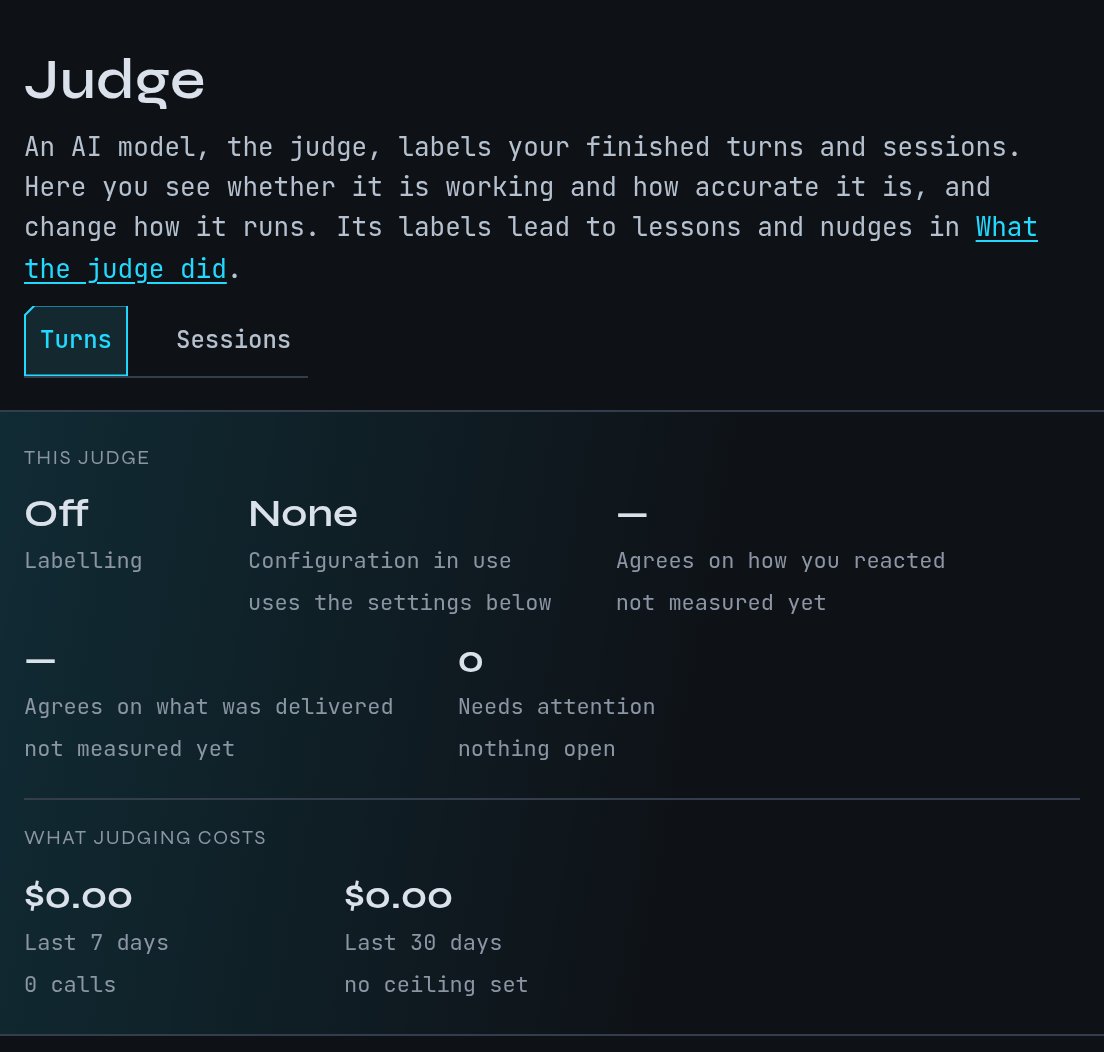
This is a fictional example. The docs session in ~/projects/site is a small
demonstration; nothing here comes from a real capture.
Follow the example correction
Continue the example from Quickstart: in the docs session you wrote “Put
Homebrew first on the install page.” because Claude had listed Homebrew second.
- Open Judge and check the strip under the heading. Labelling should read On. If it reads Off, use the switch Label new turns (on the Turns tab) further down the page. It stays greyed until an OpenRouter key is set under Integrations in Settings.
- Let the session carry on. A little later the turn judge reads the turn where Claude put Homebrew second, sees your correction in the next message and labels that turn as one you corrected.
- Open What the judge did, http://localhost:9990/sessions/improvement. Under Waiting for you, the Lessons tab can offer a lesson drawn from your correction. Approve it and later sessions in the project can be given “Homebrew first on the install page” without you typing it. Rejecting it discards the candidate. See Memory for what a lesson does next.
- The same page has What you keep saying, things you have told Claude three or more times across a week or more or in more than one project, and Is it getting better, which compares correction counts before and after each change. The page itself notes that these are periods compared, not a controlled experiment.
Nudges and standing directives that the judge’s labels drive are the other two tabs under Waiting for you. They read No nudges are waiting for your answer. and No standing directives are waiting on you. when there are none.
Read the Judge page
The strip at the top shows, for the tab you are on:
- Labelling, on or off.
- Configuration in use, a number and its model, or None when the settings further down the page apply.
- Agrees on…, how often the judge’s answer matched the label in the latest accuracy run, with a link to that run.
- Needs attention, the number of open alarms, with a link to them.
- What judging costs, for the last 7 days and the last 30 days.
How the judge works opens a short explanation. What each label means (Turns tab) lists every label and the rules the labellers followed for mixed cases.
Below those are the switch, the configuration in use, a panel of agreement figures, any open alarms, a note on labelling older turns again, the saved configurations, and the settings.
Change how the judge runs
A configuration is a model, a prompt and an input format saved together and tested against the accuracy set. To change what runs, choose a configuration on the page and confirm; the page asks you to confirm before it changes anything. You can also edit the settings directly.
| Setting | Turn judge | Session judge |
|---|---|---|
| Model | google/gemini-3.8-flash |
google/gemini-3.5-flash-lite |
| Work per round | Turns per sweep, 50 | Sessions per poll, 25 |
| How often | Seconds between sweeps, 60 | Seconds between polls, 120 |
| When a session is ready | Settled after (secs), 60 | |
| How much text per call | Turns in the digest, 40; Max chars per turn, 3000 | |
| Request timeout (secs) | 30 |
The model must support structured output. The session judge’s page warns that Anthropic models on OpenRouter reject that request with an error, so pick an OpenAI or Google model there. Changing the session judge’s model makes sessions it already scored eligible again. System prompt holds the rubric; Reset to default restores the built-in one.
Measure accuracy
Judge accuracy, http://localhost:9990/sessions/labelling/accuracy, lists accuracy runs for Turns and Sessions. In a run the judge labels a fixed set of items that were labelled beforehand, and each answer is compared with that label. Most of those labels were made by AI too: two models labelled each turn separately and a third settled the differences; the rest are labels you chose. A score is agreement with those labels, not proof the judge is right.
Open a run and choose Review labels to go through the items where the judge and the label differ and say which is right. Your answer becomes that item’s label, so it counts in every run that includes it. Use this run’s configuration opens the change step on the Judge page, where you confirm it.
Start a run from the command line:
mike eval run                      # turn judge
mike eval run --role session_judge
A run spends model calls. --max-usd caps it and defaults to 1; --dry-run shows what it
would do. Every option is in mike eval run --help and in Command line.
With no runs the page reads No accuracy runs yet and shows the command to start one.
What leaves your machine
- Sent to Anthropic: nothing. Labels are stored; they change a request only when you approve a lesson or directive, or turn on nudges.
- Sent to another service: yes. The turn judge sends each finished turn it labels; the
session judge sends a digest of the session’s turns. The model name decides where: a name
that begins
claude/runs theclaudeprogram on this machine,codex/runs the local Codex program, and others such asgoogle/…oropenai/…go to OpenRouter. The guard, lesson proposals and the steerer use the same providers; see Steering. - Cost controls: the batch and timer settings above, Turns per sweep being the ceiling
on one sweep’s calls; daily call caps for labelling older turns again;
--max-usdon accuracy runs; and the cost strip on the page.
See Privacy.
When nothing shows
| What you see | Why and what to do |
|---|---|
| Labelling is Off | Fresh installs have both judges off. Switch it on once a key is set. mike features everything turns it on with every other feature |
| The switch is greyed with Set up your OpenRouter key in Integrations to switch it on. | The page needs an OpenRouter key before it will switch on, whichever model is chosen. Add one under Integrations in Settings |
| Configuration in use reads None | Judging uses the settings further down the page |
| Agreement shows no figure | There is no accuracy run yet. Run mike eval run |
| Some of this page could not be loaded | A request failed. Reload; see Troubleshooting |
| No nudges are waiting for your answer. | The guard has not sent a nudge that needs your verdict, or it is off. See Steering |