This page runs the example fleet from start to finish: the install page, the quickstart and a
link check for the website in ~/projects/site. It takes about as long as the slowest task,
plus a few minutes for mike to open the sessions. What each step does underneath is in
How a fleet runs.
Write the definition with /fleet
-
Open a Claude Code session in
~/projects/siteand run:/fleet Rewrite the install page and the quickstart, Homebrew first, and add a link checkmike servewrites this command to~/.claude/commands/fleet.mdwhen no file of that name exists. A file you edited or linked there is left alone. -
That session is the fleet’s author. It reads the project’s instructions, writes the definition with mike’s
define_fleettool, and fixes what mike says is missing until nothing is. For the example it writes three outcomes:Outcome What you asked How it is checked C1 Homebrew first on the install page The Homebrew section is the first install method on the built /installpageC2 The quickstart matches the install page Every install command in quickstart.mdappears on the install pageC3 A link check scripts/check-linksexits 0 on the built site and 1 on a page with a broken linkIt then writes the three tasks and the files each one owns, as in the table on Fleets.
-
The author marks the fleet ready and reports where to watch: the fleet’s short name (its slug, here
site-docs), the command to watch it, and which sessions started. Then it stops. It does none of the work itself.
To see what a fleet would start without starting it, put --drill before the goal. The author
then writes the definition, does not mark it ready, and reports what would start.
Watch it start
Run:
mike fleet list
The new fleet is the top row, with its state and how many items its definition still lacks. Then follow it:
mike fleet status site-docs --watch 5
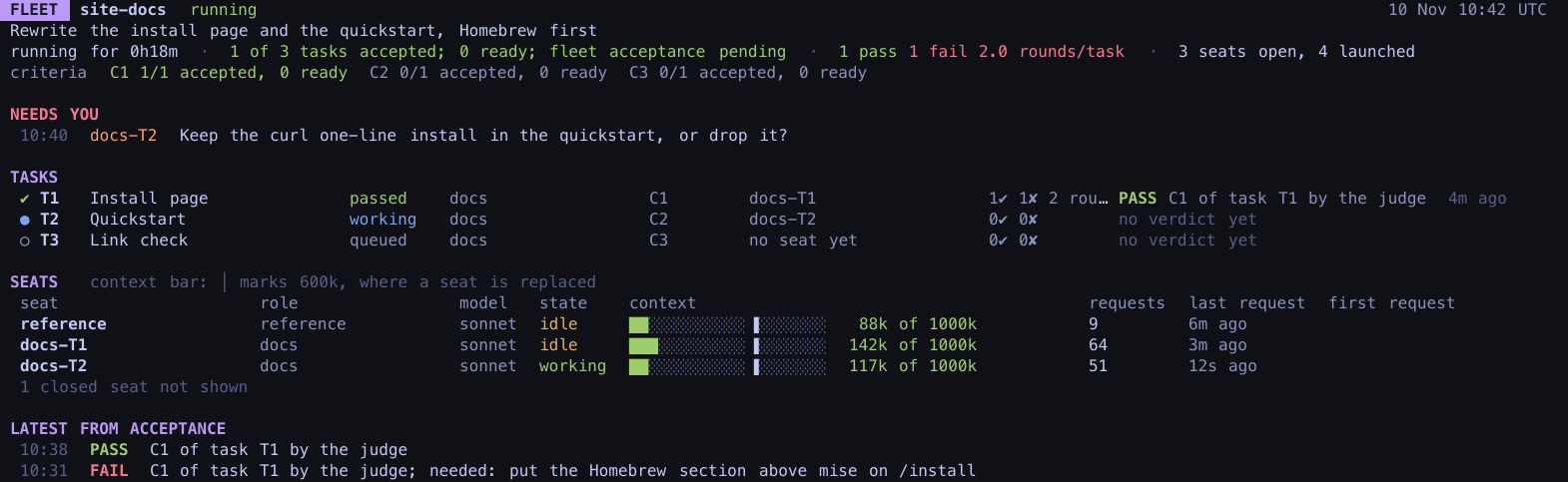
Within a minute or two the screen shows:
- the status pane and one
docstemplate session, which reads the project and closes; - the reference session, which stays open to answer the others’ questions;
- a worker on T1 and a worker on T2, both working;
- T3 waiting, because it needs T1 and T2 to pass first.
A terminal pane opens for each session, so you can read along. You do not need to type in them.
While it works
Each worker edits its own file, commits it with fleet_commit, and files a report. mike runs
the project’s check on each commit and the judge reads each report. You see the results on the
status screen as they arrive:
[mike judge] PASS task T1 C1 at 3f9c2a71d0: the Homebrew section is the first install method on /install
When T1 and T2 have both passed, T3’s worker starts on mike’s next round, within 20 seconds.
If a worker needs something only you can give, such as a decision about wording, the screen
shows it under NEEDS YOU. Run mike fleet focus site-docs to bring that session’s pane to the
front and answer there. Watch a fleet and step in covers this and the
other flags.
When it is done
When all three tasks have passed, mike closes the sessions and the status pane, and the fleet
reads done in mike fleet list. The commits are on your branch, already pushed. See how the
run went:
mike fleet record site-docs
It prints the time to done, the minutes lost to faults, the tokens spent per accepted task, and how often you had to step in. After a run explains the numbers and what happens next.
If it does not start
mike fleet listexits withcould not reach the inspect API: mike is not running. Start it (see Setup)./fleetwrites no definition and says the goal is one task: the goal does not split into two tasks on separate files. Do it in one session.- The fleet reads
failed: ask Claude for the fleet’s state (get_fleet, see MCP) and read its start report, fix the definition, and mark it ready again. - The fleet waits in
ready: you turned off Start fleets on their own (fleet_auto_start) in Settings. Runmike fleet start site-docs.