The sessions in a fleet do not work blind. Each one can find out what the others have done, ask a specific session a question, leave a decision where the others will find it, and be woken by a message while it is idle. mike also passes information between them on its own: it tells a file’s owner when a check fails in that file, and it introduces two sessions that are doing the same slow work. This page explains each of these and what they give you over one session working alone or a team of people coordinating by hand.
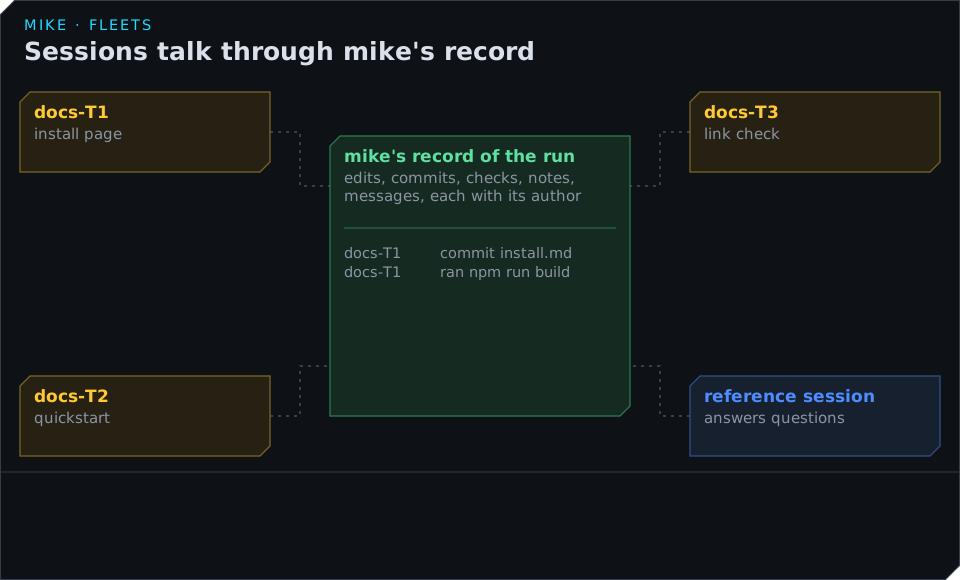
mike’s record of the run
Everything the sessions do passes through mike, because their traffic does. mike keeps one record of the run: every file a session edited, every commit, every check result, every note and every message, each with the session that made it and when. The sessions do not have to tell each other what they did, because they can read it from that record. Nobody writes status reports, and nothing is out of date, because the record is what actually happened.
Finding out what the others are doing
A worker uses these questions to mike, each a tool it already has:
| To learn | It asks | It gets |
|---|---|---|
| What others changed since it last looked | what_changed with view changes |
Each edit, commit, check result, note and message since its last look, with who made it. By default only the files it owns or has read; all for every file. |
| Where it stands | what_changed with view standing |
Its task and state, its uncommitted files, how many changes are waiting for it, and its open questions |
| Who owns a file and who last touched it | what_changed with view whose and a path |
The task that owns it, the session that last changed it, and whether that change is committed |
| A diff of someone else’s work | what_changed with view diff |
A bounded diff for a commit, or for a path since it last looked |
| Who else is in the fleet | get_fleet with view seat |
Its own task and every other session by name, task and state |
| How the whole fleet is doing | get_fleet with view digest |
Each task’s state, what has been accepted, what is still open, and builds waiting to run |
| Where something is defined | fleet_where with a name |
The file and line of each definition, and where it is used |
| What commands others ran | list_fleet_results |
The commands other sessions ran and what changed since each one |
In the example, the quickstart worker (T2) needs to match the install page that T1 is rewriting.
Instead of reading git status, which would show everyone’s unfinished edits mixed together, it
asks what_changed:
docs-T1  committed install.md (3f9c2a71)  2 min ago  "Homebrew first, then mise, then the archive"
check    passed at 3f9c2a71
It then reads install.md at that commit and writes the quickstart to match. It never had to
interrupt T1.
Asking another session
When reading is not enough, a worker asks. The ask tool sends a question to:
- a session by its id;
task:T1, whichever session holds task T1 at the moment, even if that session was replaced;owner:install.md, the session whose task owns that file;reference, the reference session, for questions about how the code works.
ask to: task:T1 "Is mise still the second install method?" blocked: false
The question stays open in the recipient’s standing view until it answers or declines, and the
asker is told once when it does. A worker that says it is blocked keeps doing whatever else it
can meanwhile. If a blocked question is still open after 5 minutes, mike passes it to the
reference session, which answers with a file and a line. When an answer changes what a task must
do, the answerer can add the question and the answer to the end of that task’s brief, so the next
session on the task reads it too.
Sessions can also send plain messages to each other with send_session_message, for anything
that is not a question, such as “I have pushed the new install page; your quickstart can use
it.”
How a message reaches a session
A message reaches its recipient even when that session is idle and waiting for nothing. mike tries three ways, in order:
- The session’s mike channel. Sessions that mike starts listen for mail, and an idle session wakes and takes a turn on the message within a few seconds.
- Remote Control, when the session has it open.
- The session’s next request, where mike adds the message to what Claude reads.
If a worker has had unread mail for 5 minutes and still has not answered, mike wakes it, and replaces it if it stays silent; see Watch a fleet and step in.
A message is information, never an order. A worker never lets a message override its brief or
the fleet’s rules, and before acting on a message that reports a verdict, or says another session
deleted or reverted something, it checks with mike that the message is genuine
(verify_session_message).
Leaving a decision for the others
A worker writes what it learns as a note in its notebook, which every session in the fleet can
read with list_session_notes:
| Kind | For |
|---|---|
finding |
Something established, such as “the archive download needs the checksum line” |
decision |
A choice a later session would otherwise reopen, with the reason |
task |
Work in flight, with its status |
result |
Written by mike for each commit: the files, how it was verified, and any warnings |
In the example, T1 writes a decision: “Install methods in this order: Homebrew, mise, archive. Reason: your correction, and Homebrew users are most of the readers.” T3, which starts later, reads it before writing the link check and does not have to ask.
A note marked to carry over is offered to you as a lesson for later fleets; see After a run.
What mike passes on by itself
Some information reaches the right session without anyone asking for it:
- When a check fails, mike reads the file names in its output and tells the sessions that own those files, not everyone.
- When an uncommitted edit breaks the project, mike works out whose edit did it and tells that session.
- When two sessions run the same slow command, each taking more than 5 seconds, mike introduces them with the commands and their results, so one can reuse the other’s work instead of running it again.
- When a session proposes a new task that needs a file another task owns, mike holds the proposal and asks the owning session to release the file or decline.
- The reference session is told about every failed verdict and about any worker that has gone 10 minutes into its task without a commit, so it can step in with an answer before anyone asks.
- Each worker’s verdict comes to it as a message, with the one thing a fail still needs.
Compared with one session, or with a team
A single Claude Code session can hand work to subagents, but each subagent works alone and returns one summary at the end. Subagents do not see what the others changed and do not ask each other anything; only the session that started them can reach them, and it is the only place their results meet. In a fleet each worker is a whole session with its own context, and the sessions find things out and answer each other while they work.
A team of people working side by side spends time keeping each other informed: stand-ups, status messages, asking who is working on what. In a fleet that time goes away, because the record of the run already holds who changed what, a question can be addressed to a task or a file rather than a person, and a failure reaches the owner of the file without anyone sorting it.
| One session with subagents | A team working by hand | A fleet | |
|---|---|---|---|
| See what others changed | Only in the summaries they return | Ask, or read the history | what_changed, from the record |
| Ask a question mid-task | No | Message a person who may be busy | ask by task, file or session; passed on after 5 minutes |
| Share a decision | In the final summary | A message or a document | A decision note any session reads |
| Learn about a failure in your file | When the session reports it | When someone notices | mike tells the file’s owner |
| Avoid repeating slow work | No | If someone mentions it | mike introduces the two sessions |
| Reach someone who is idle | Only from the session that started it | Wait | The message wakes the session |
Watching the conversation yourself
You can read every message between the sessions while the fleet runs. Open Comms in the web UI, http://localhost:9990/comms, for every conversation in the project, or the Fleet page for a graph of which sessions talked to which; see Read messages between sessions. Inside a fleet’s own sessions, the fleet-comms mod shows the newest message above the prompt.